
Wie erstelle, starte und konfiguriere ich eine Amazon EC2-Instanz mit einem einfachen Ansible-Skript? (VM aus der Ferne spawnen)
Veröffentlicht: 2019-05-11
Amazon AWS ist zweifellos die best public cloud auf dem Markt. Wie wir in früheren Tutorials besprochen haben, ist Ansible ein sehr praktisches Tool für Sysops, um ihre Unternehmensinfrastruktur zu warten.
In diesem Tutorial werden wir die Schritte zum Erstellen, Starten und Einrichten einer Amazon EC2-Instanz mit einfachen Ansible-Skripten durchgehen.
Einzelheiten:
- spezifizieren Sie instance_type:
t2.micro - Sicherheitsgruppe angeben:
crunchify_security_grp- Ändern Sie die Sicherheitsgruppe nach Bedarf.
- Bild angeben:
ami-crunchify231di- Sie müssen Amazon Image erstellen, bevor Sie dies ausführen.
- Schlüsselpaar angeben:
crunchify- Dies ist Ihr Sicherheitsschlüssel für die passwortlose Anmeldung.
- Wählen Sie die Standardregion:
us-east-2- Standardregion, die ich empfehlen würde.
- Anzahl der VMs, die Sie starten möchten: 1
- Beginnen Sie mit VM 1.
- Erstellen Sie eine grundlegende Firewall-Gruppe
- Erstellen Sie eine Amazon EC2-Instance
- Warten Sie, bis ein Beispiel angezeigt wird
- Holen Sie sich die IP-Adresse und speichern Sie sie in der Datei crunchify.txt
- Sie müssen crunchify.txt erstellen, bevor Sie dieses Ansible-Skript ausführen.
- Kennzeichnen Sie die neu erstellte Instanz als crunchify
Schritt 1)
Ansible unter macOS installieren. Stellen Sie sicher, dass Sie Ansible richtig eingerichtet haben
Schritt 2)
Sie müssen Ihren AWS- Access Key und Ihren Secret Access Key exportieren. Bitte folgen Sie dem Tutorial zum Einrichten der Amazon AWS CLI, um Ihre Schlüssel zu erhalten.
|
1 2 |
export AWS_ACCESS_KEY_ID = JHKHLJLHJHJK2SHIY27AIF export AWS_SECRET_ACCESS_KEY = QLKJDKIAYXNIWN2ZHIY27AI54345HKLHJ |
Schritt-3) Crunchify-Host-Datei erstellen
|
1 2 |
[ local ] localhost ansible_connection = local ansible_python_interpreter = python |
Schritt-4) Erstellen Sie die Datei crunchify-ec2.yml
|
1 2 3 4 5 6 7 8 9 10 11 12 13 14 15 16 17 18 19 20 21 22 23 24 25 26 27 28 29 30 31 32 33 34 35 36 37 38 39 40 41 42 43 44 45 46 47 48 49 50 51 52 53 54 55 56 57 58 59 60 61 62 63 64 65 66 67 68 69 70 71 72 73 74 75 76 77 78 79 80 |
--- - name : Provision an EC2 Instance . Detailed steps by Crunchify . hosts : local connection : local gather_facts : False tags : provisioning # required parameters vars : instance_type : t2 . micro security_group : crunchify_security_grp image : ami - crunchify231di keypair : crunchify region : us - east - 2 # Change the Region count : 1 # Task that will be used to Launch/Create an EC2 Instance tasks : - name : Create a security group local_action : module : ec2_group name : "{{ security_group }}" description : Security Group for Crunchify 's EC2 Servers region: "{{ region }}" rules: - proto: tcp from_port: 22 to_port: 22 cidr_ip: 0.0.0.0/0 - proto: tcp from_port: 8080 to_port: 8080 cidr_ip: 0.0.0.0/0 - proto: tcp from_port: 443 to_port: 443 cidr_ip: 0.0.0.0/0 rules_egress: - proto: all cidr_ip: 0.0.0.0/0 register: basic_firewall - name: Launching Crunchify' s the new EC2 Instance local_action : ec2 group = { { security_group } } instance_type = { { instance_type } } image = { { image } } wait = true wait_timeout = 500 region = { { region } } keypair = { { keypair } } count = { { count } } register : ec2_crunchify - name : Add the newly created EC2 instance ( s ) to the local host group local_action : lineinfile path = crunchify . txt regexp = { { item . public_ip } } insertafter = '\[crunchify\]' line = { { item . public_ip } } with_items : '{{ec2_crunchify.instances}}' - name : Add new instance to Crunchify 's host group add_host: hostname: "{{ item.public_ip }}" groupname: launched with_items: "{{ ec2_crunchify.instances }}" - name: Let' s wait for SSH to come up . Usually that takes ~ 10 seconds local_action : wait_for host = { { item . public_ip } } port = 22 state = started with_items : '{{ ec2_crunchify.instances }}' - name : Add tag to Instance ( s ) local_action : ec2_tag resource = { { item . id } } region = { { region } } state = present with_items : '{{ ec2_crunchify.instances }}' args : tags : Name : crunchify |
Schritt-5) Ansible Playbook ausführen
|
1 |
ansible - playbook - i . / hosts crunchify - ec2 . yml |
Ansible Ergebnis:
|
1 2 3 4 5 6 7 8 9 10 11 12 13 14 15 16 17 18 19 20 21 22 23 24 25 26 27 28 29 30 31 32 |
bash3 . 2 $ ansible - playbook - i . / hosts crunchify - ec2 . yml PLAY [ Provision an EC2 Instance . Detailed steps by Crunchify . ] **************************************************************************************************************** TASK [ Create a security group ] ************************************************************************************************************************************************ ok : [ localhost - > localhost ] TASK [ Master - Launch the new EC2 Instance ] *********************************************************************************************************************************** changed : [ localhost - > localhost ] TASK [ Add the newly created EC2 instance ( s ) to the local host group ] ********************************************************************************************************** changed : [ localhost - > localhost ] = > ( item = { u 'ramdisk' : None , u 'kernel' : None , u 'root_device_type' : u 'ebs' , u 'private_dns_name' : u 'ip-172-31-41-108.us-east-2.compute.internal' , u 'block_device_mapping' : { u '/dev/sda1' : { u 'status' : u 'attached' , u 'delete_on_termination' : True , u 'volume_id' : u 'vol-06d37e8354c769d93' } } , u 'key_name' : u 'crunchify' , u 'public_ip' : u '3.19.60.48' , u 'image_id' : u 'ami-crunchify231di' , u 'tenancy' : u 'default' , u 'private_ip' : u '172.31.41.108' , u 'groups' : { u 'sg-0eb80f388be5a7c35' : u 'crunchify_security_grp' } , u 'public_dns_name' : u 'ec2-3-19-60-48.us-east-2.compute.amazonaws.com' , u 'state_code' : 16 , u 'id' : u 'i-0e447dd1223a40f8e' , u 'tags' : { } , u 'placement' : u 'us-east-2c' , u 'ami_launch_index' : u '0' , u 'dns_name' : u 'ec2-3-19-60-48.us-east-2.compute.amazonaws.com' , u 'region' : u 'us-east-2' , u 'ebs_optimized' : False , u 'launch_time' : u '2019-05-10T18:48:18.000Z' , u 'instance_type' : u 't2.micro' , u 'state' : u 'running' , u 'architecture' : u 'x86_64' , u 'hypervisor' : u 'xen' , u 'virtualization_type' : u 'hvm' , u 'root_device_name' : u '/dev/sda1' } ) TASK [ Add new instance to host group ] ***************************************************************************************************************************************** changed : [ localhost ] = > ( item = { u 'ramdisk' : None , u 'kernel' : None , u 'root_device_type' : u 'ebs' , u 'private_dns_name' : u 'ip-172-31-41-108.us-east-2.compute.internal' , u 'block_device_mapping' : { u '/dev/sda1' : { u 'status' : u 'attached' , u 'delete_on_termination' : True , u 'volume_id' : u 'vol-06d37e8354c769d93' } } , u 'key_name' : u 'crunchify' , u 'public_ip' : u '3.19.60.48' , u 'image_id' : u 'ami-crunchify231di' , u 'tenancy' : u 'default' , u 'private_ip' : u '172.31.41.108' , u 'groups' : { u 'sg-0eb80f388be5a7c35' : u 'crunchify_security_grp' } , u 'public_dns_name' : u 'ec2-3-19-60-48.us-east-2.compute.amazonaws.com' , u 'state_code' : 16 , u 'id' : u 'i-0e447dd1223a40f8e' , u 'tags' : { } , u 'placement' : u 'us-east-2c' , u 'ami_launch_index' : u '0' , u 'dns_name' : u 'ec2-3-19-60-48.us-east-2.compute.amazonaws.com' , u 'region' : u 'us-east-2' , u 'ebs_optimized' : False , u 'launch_time' : u '2019-05-10T18:48:18.000Z' , u 'instance_type' : u 't2.micro' , u 'state' : u 'running' , u 'architecture' : u 'x86_64' , u 'hypervisor' : u 'xen' , u 'virtualization_type' : u 'hvm' , u 'root_device_name' : u '/dev/sda1' } ) TASK [ Wait for SSH to come up ] ************************************************************************************************************************************************ ok : [ localhost - > localhost ] = > ( item = { u 'ramdisk' : None , u 'kernel' : None , u 'root_device_type' : u 'ebs' , u 'private_dns_name' : u 'ip-172-31-41-108.us-east-2.compute.internal' , u 'block_device_mapping' : { u '/dev/sda1' : { u 'status' : u 'attached' , u 'delete_on_termination' : True , u 'volume_id' : u 'vol-06d37e8354c769d93' } } , u 'key_name' : u 'crunchify' , u 'public_ip' : u '3.19.60.48' , u 'image_id' : u 'ami-crunchify231di' , u 'tenancy' : u 'default' , u 'private_ip' : u '172.31.41.108' , u 'groups' : { u 'sg-0eb80f388be5a7c35' : u 'crunchify_security_grp' } , u 'public_dns_name' : u 'ec2-3-19-60-48.us-east-2.compute.amazonaws.com' , u 'state_code' : 16 , u 'id' : u 'i-0e447dd1223a40f8e' , u 'tags' : { } , u 'placement' : u 'us-east-2c' , u 'ami_launch_index' : u '0' , u 'dns_name' : u 'ec2-3-19-60-48.us-east-2.compute.amazonaws.com' , u 'region' : u 'us-east-2' , u 'ebs_optimized' : False , u 'launch_time' : u '2019-05-10T18:48:18.000Z' , u 'instance_type' : u 't2.micro' , u 'state' : u 'running' , u 'architecture' : u 'x86_64' , u 'hypervisor' : u 'xen' , u 'virtualization_type' : u 'hvm' , u 'root_device_name' : u '/dev/sda1' } ) TASK [ Add tag to Instance ( s ) ] ************************************************************************************************************************************************* changed : [ localhost - > localhost ] = > ( item = { u 'ramdisk' : None , u 'kernel' : None , u 'root_device_type' : u 'ebs' , u 'private_dns_name' : u 'ip-172-31-41-108.us-east-2.compute.internal' , u 'block_device_mapping' : { u '/dev/sda1' : { u 'status' : u 'attached' , u 'delete_on_termination' : True , u 'volume_id' : u 'vol-06d37e8354c769d93' } } , u 'key_name' : u 'crunchify' , u 'public_ip' : u '3.19.60.48' , u 'image_id' : u 'ami-crunchify231di' , u 'tenancy' : u 'default' , u 'private_ip' : u '172.31.41.108' , u 'groups' : { u 'sg-0eb80f388be5a7c35' : u 'crunchify_security_grp' } , u 'public_dns_name' : u 'ec2-3-19-60-48.us-east-2.compute.amazonaws.com' , u 'state_code' : 16 , u 'id' : u 'i-0e447dd1223a40f8e' , u 'tags' : { } , u 'placement' : u 'us-east-2c' , u 'ami_launch_index' : u '0' , u 'dns_name' : u 'ec2-3-19-60-48.us-east-2.compute.amazonaws.com' , u 'region' : u 'us-east-2' , u 'ebs_optimized' : False , u 'launch_time' : u '2019-05-10T18:48:18.000Z' , u 'instance_type' : u 't2.micro' , u 'state' : u 'running' , u 'architecture' : u 'x86_64' , u 'hypervisor' : u 'xen' , u 'virtualization_type' : u 'hvm' , u 'root_device_name' : u '/dev/sda1' } ) PLAY RECAP * ******************************************************************************************************************************************************************* localhost : ok = 6 changed = 4 unreachable = 0 failed = 0 |
Lassen Sie uns überprüfen, ob die neue Instanz mit all unseren Spezifikationen erfolgreich erstellt wurde
Gehen Sie zur Amazon AWS console , um die Instanz zu überprüfen.

Link: https://us-east-2.console.aws.amazon.com/ec2/v2/home?region=us-east-2#Instances:sort=instanceId
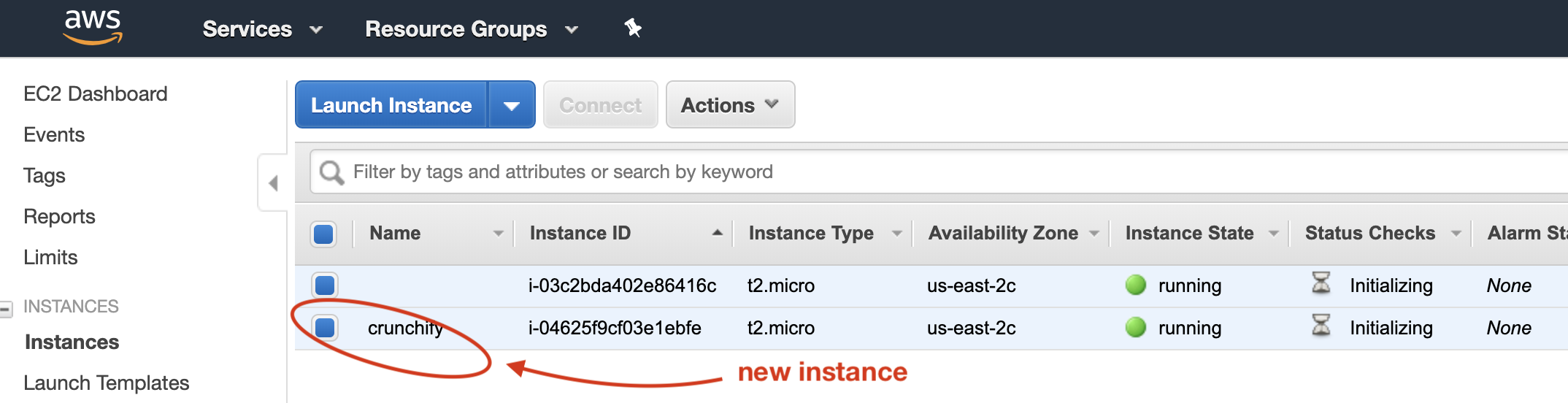
Stellen Sie sicher, dass Sie alle Ihre Einstellungen überprüfen.
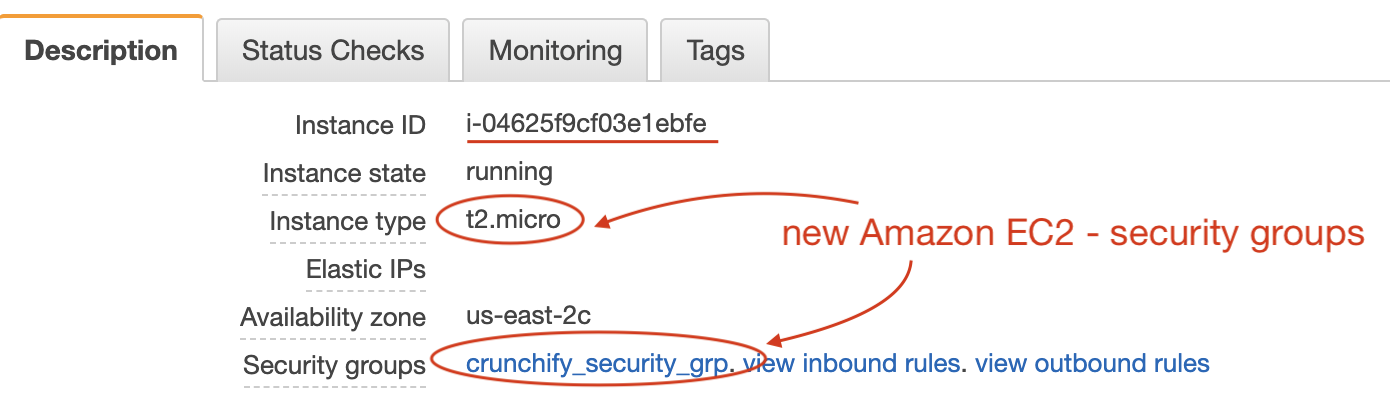
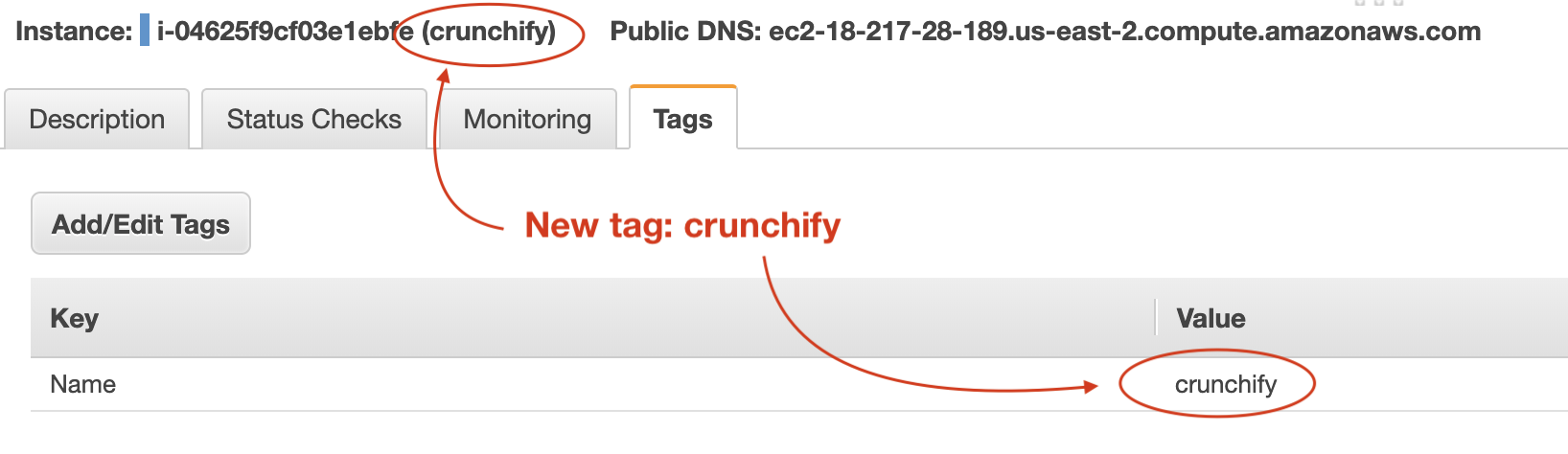
Überprüfen Sie Ihre Tags. Dies ist sehr hilfreich, wenn Sie es mit hundreds of instances zu tun haben.
Überprüfen Sie die Datei crunchify.txt, die die IP des neu erstellten Hosts enthält:
|
1 2 |
bash3 . 2 $ cat crunchify . txt 18.217.28.189 |
Das ist es. Glückwunsch. Sie haben gerade eine neue EC2-Instance in der Amazon AWS-Cloud remote mit Ansible erstellt und gestartet.
Lassen Sie mich wissen, wenn Sie auf Probleme beim Erstellen einer Instanz in der Amazon EC2-Cloud stoßen.