
20 多個最受歡迎的 WordPress 循環黑客
已發表: 2017-12-20循環是 WordPress 中的主要過程,因此幾乎在每個主題文件中都可以找到。 本質上,它是平台用來通過主題模板文件顯示帖子的 PHP 代碼。 換句話說,它是巨大的。 事實上,這很關鍵,因為如果沒有循環,該站點將無法工作。
調整這組令人難以置信的強大功能可能會提升您的 WordPress 網站的功能。 例如,您可以更改帖子在主頁上的顯示方式,並使用特定參數對其進行排序。 鑑於循環是最容易修改的東西,人們可以獲得非常令人印象深刻和創造性的技巧。
讓我們向您展示 20 多種循環技巧,您現在應該使用它來實現它,而無需安裝插件。
#1。 在第一篇文章之後放置廣告
作為博主,您非常清楚廣告是賺錢的最佳方式之一。 從訪問者那裡獲得那些急需的點擊肯定是一件棘手的事情,許多博主並不喜歡高點擊率。 在第一個帖子之後放置廣告可能是增加它們的好方法,所以試試這個簡單的調整。
用下面的循環替換你的循環。 請注意,因為您必須在此處粘貼廣告代碼:
<?php if (have_posts()) : ?>
<?php $count = 0; ?>
<?php while (have_posts()) : the_post(); ?>
<?php $count++; ?>
  <?php if ($count == 2) : ?>
          //Insert the code of an ad in this line
          <h2><a href="<?php the_permalink(); ?>"><?php the_title(); ?></a></h2>
          <?php the_excerpt(); ?>
   <?php else : ?>
          <h2><a href="<?php the_permalink(); ?>"><?php the_title(); ?></a></h2>
          <?php the_excerpt(); ?>
  <?php endif; ?>
<?php endwhile; ?>
<?php endif; ?>
#2。 顯示過時但流行的 1 年前的帖子

您博客上的一些帖子雖然是在一年前創建的,但可能仍然在您的讀者中很受歡迎。 例如,它可以是操作指南文章或其他類型的常青內容。 為了確保這些帖子保持流行,您可以應用這個方便的技巧。
將此代碼插入到 single.php 文件中:
<?php
$current_day = date('j');
$last_year = date('Y')-1;
query_posts('day='.$current_day.'&year='.$last_year);
if (have_posts()):
    while (have_posts()) : the_post();
       the_title();
       the_excerpt();
    endwhile;
endif;
?>
#3。 在循環中顯示五個最新的置頂帖子
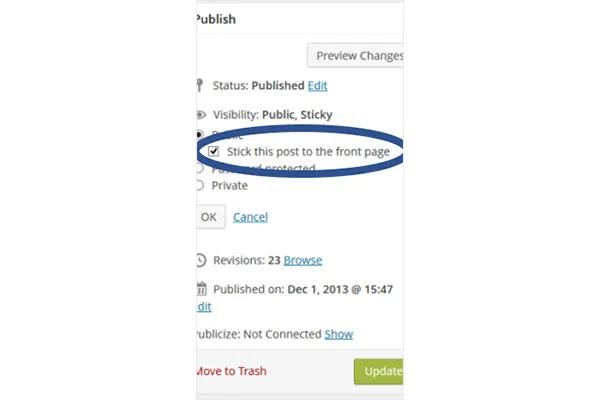
默認功能允許將一篇帖子粘貼到首頁。 下面的黑客放置了五個粘性帖子。
許多博主將置頂帖子視為特色帖子,因為它們允許條目顯示在其他帖子之上。 如果您想創建自己的“編輯精選”類別,可以使用 hack。 下面的代碼必須插入主題中的任何位置才能工作。 您還可以通過替換第四行中的數字來更改數字以顯示更少的帖子。
<?php
$sticky = get_option('sticky_posts');
rsort( $sticky );
$sticky = array_slice( $sticky, 0, 5);
query_posts( array( 'post__in' => $sticky, 'caller_get_posts' => 1 ) );

if (have_posts()) :
    while (have_posts()) : the_post();
        the_title();
        the_excerpt();
    endwhile;
endif;

?>
#4。 列出特定類別的帖子
使用下面的 hack 區分來自同一類別的帖子。
如果出於某種原因您需要區分共享同一類別的帖子(例如,論文作者的操作指南文章),請將以下代碼插入到循環文件中。
<?php foreach((get_the_category()) as $category) {
      	$thecat = $category->cat_ID . ' ';
    	query_posts('child_of='.$thecat);
 if (have_posts()) : while (have_posts()) : the_post();
    //Classic WP loop
 endwhile;endif;
?>
#5。 提供未來職位列表
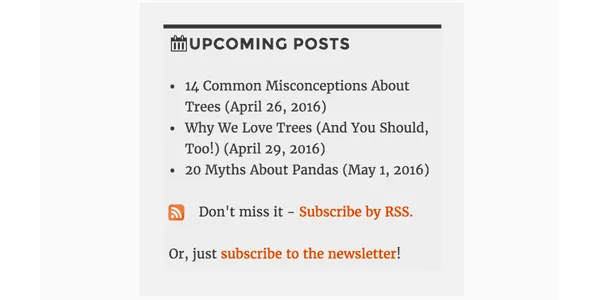
讓讀者了解即將發布的帖子可能會激發他們的興趣並讓他們返回您的博客閱讀它們。 如果這對您來說是個好主意,請使用下面的代碼在您的 WordPress 網站上提供即將發布的帖子的簡短列表。
<?php query_posts('showposts=10&post_status=future'); ?>
<?php if ( have_posts() ) : while ( have_posts() ) : the_post(); ?>
    <h2><?php the_title(); ?></h2>
    <span class="datetime"><?php the_time('j. F Y'); ?></span></p>
<?php endwhile;
else: ?><p>No future events scheduled.</p>
<?php endif; ?>
#6。 獲取在特定日期上傳的帖子
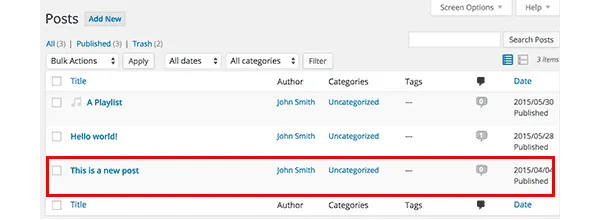
如果您經常在您的提要中查找一些帖子,您可以使用循環搜索它們。 可以通過插入以下代碼使搜索變得非常容易。 具體來說,它檢索在您指定的兩個日期之間發布的條目。
<?php
  function filter_where($where = '') {
        $where .= " AND post_date >= '2012-08-19' AND post_date <= '2012-08-11'";
    return $where;
  }
add_filter('posts_where', 'filter_where');
query_posts($query_string);
while (have_posts()) :
      the_post();
      the_content();
endwhile;

?>
#7。 顯示圖像循環
WordPress 網站首頁上的圖片庫是個好主意,因為大多數人都喜歡視覺效果。 如果您的帖子包含主要圖片,下面的代碼將檢索它們以循環展示。
將以下代碼插入到 functions.php 文件中:
function catch_that_image() {
  global $post, $posts;
  $first_img = '';
  ob_start();
  ob_end_clean();
  $output = preg_match_all('/<img.+src=['"]([^'"]+)['"].*>/i', $post->post_content, $matches);
  $first_img = $matches [1] [0];

  if(empty($first_img)){ //Determines a default image
    $first_img = "/images/default.jpg";
  }
  return $first_img;
}
#8。 通過設置過期日期自動刪除帖子
假設您正在舉辦一場比賽以增加您博客上的讀者群。 比賽結束後,您會公佈結果,最重要的是公佈答案或提示,以及它們的線索。 當然,讀者不應該永遠可以訪問它們,因為您將來可能會舉辦另一場比賽,對吧?
即使您忘記了帖子,也可以刪除它們的一個好方法是通過設置到期日期來安排它。 下面的循環替換了您現有的循環並做到了這一點。
不要忘記使用 mm/dd/yyyy 00:00:00 格式來替換過期時間。
<?php
if (have_posts()) :
while (have_posts()) : the_post(); ?>
$expirationtime = get_post_custom_values('expiration');
if (is_array($expirationtime)) {
$expirestring = implode($expirationtime);
}

$secondsbetween = strtotime($expirestring)-time();
if ( $secondsbetween > 0 ) {
// For example…
the_title();
the_excerpt();
}
endwhile;
endif;
?>
#9。 從引用中分離評論

您博客上的熱門條目將與許多其他網站鏈接。 為確保讀者可以舒適地關注評論部分的討論,您應該將評論和引用分開。
您所要做的就是打開 comments.php 並查找以下內容:
foreach ($comments as $comment) : ?>
// Comments are displayed here
endforeach;
找到了? 太好了,現在用新代碼替換它:
<ul class="commentlist">
<?php //Displays comments only
foreach ($comments as $comment) : ?>
<?php $comment_type = get_comment_type(); ?>
<?php if($comment_type == 'comment') { ?>
<li>//Comment code goes here</li>
<?php }
endforeach;
</ul>

<ul>
<?php //Displays trackbacks only
foreach ($comments as $comment) : ?>
<?php $comment_type = get_comment_type(); ?>
<?php if($comment_type != 'comment') { ?>
<li><?php comment_author_link() ?></li>
<?php }
endforeach;

</ul>
#10。 顯示相關帖子

顯示相關帖子是增加讀者群的好方法。 您所要做的就是將特殊代碼粘貼到 single.php 文件中。
<?php
  $backup = $post;  // backup the current object
  $tags = ks29so_get_post_tags($post->ID);
  $tagIDs = array();
  if ($tags) {
    $tagcount = count($tags);
    for ($i = 0; $i < $tagcount; $i++) {
      $tagIDs[$i] = $tags[$i]->term_id;
    }
    $args=array(
      'tag__in' => $tagIDs,
      'post__not_in' => array($post->ID),
      'showposts'=>5,
      'caller_get_posts'=>1
    );
    $my_query = new WP_Query($args);
    if( $my_query->have_posts() ) {
      while ($my_query->have_posts()) : $my_query->the_post(); ?>
        <h3><a href="<?php the_permalink() ?>" rel="bookmark" title="<?php the_title(); ?>"><?php the_title(); ?></a></h3>
      <?php endwhile;
    } else { ?>
      <h2>No related posts found!</h2>
    <?php }
  }
  $post = $backup;  // copy it back
  ks29so_reset_query(); // to use the original query again
?>

#11。 確定特定帖子在主頁上的顯示方式
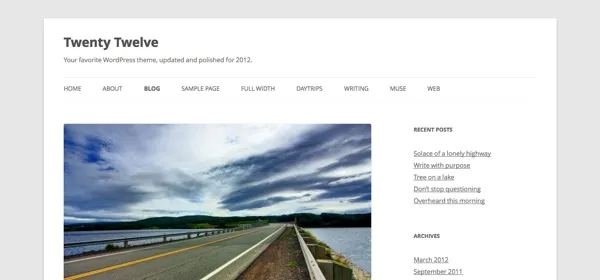
絕大多數 WordPress 主題在起始頁上以相同的方式顯示所有帖子。 但是,如果您不喜歡它,您可以更改它並定義哪些應該完全顯示,哪些只有摘錄就足夠了。
找到 index.php 文件並在那裡尋找循環。 以下代碼替換它:
<?php if (have_posts()) :
    while (have_posts()) : the_post();
         $customField = get_post_custom_values("full");
         if (isset($customField[0])) {
             //Custom field is set, display a full post
              the_title();
              the_content();
         } else {
             // No custom field set, lets display an excerpt
              the_title();
              the_excerpt();
    endwhile;
endif;
?>
#12。 在主頁上的帖子上方顯示促銷內容
在 index.php 文件中插入以下代碼以添加促銷內容。
<div class="content-loop">
#13。 列出頁面中博客的所有作者
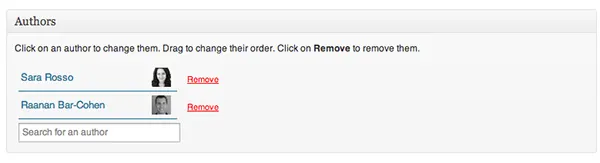
只需將此代碼粘貼到循環中的任何位置即可顯示所有作者的列表。
<ul>
<?php ks29so_list_authors('exclude_admin=0&optioncount=1&show_fullname=1&hide_empty=1'); ?>
</ul>
#14。 使用自定義字段顯示來賓作者的姓名
如果您在博客上使用來賓作者,您很可能不會為他們創建單獨的頁面。 為什麼不直接顯示他們的名字呢?
將此代碼插入到 single.php 中以執行此操作:
<?php $author = get_post_meta($post->ID, "guest-author", true);
if ($author != "") {
echo $author;
} else {
the_author();
} ?>
#15。 使圖像成為發布的強制性要求
帶有圖片的帖子通常比沒有圖片的帖子獲得更多的瀏覽量。 打開您的functions.php 文件以使它們成為強制性的。
add_action('save_post', 'wpds_check_thumbnail');
add_action('admin_notices', 'wpds_thumbnail_error');

function wpds_check_thumbnail( $post_id ) {
 // change to any custom post type
  if( get_post_type($post_id) != 'post' )
      return;

  if ( ! has_post_thumbnail( $post_id ) ) {
   // set a transient to show the users an admin message
    set_transient( "has_post_thumbnail", "no" );
   // unhook this function so it doesn't loop infinitely
    remove_action('save_post', 'wpds_check_thumbnail');
   // update the post set it to draft
    ks29so_update_post(array('ID' => $post_id, 'post_status' => 'draft'));

    add_action('save_post', 'wpds_check_thumbnail');
  } else {
    delete_transient( "has_post_thumbnail" );
  }
}

function wpds_thumbnail_error() {
 // check if the transient is set, and display the error message
  if ( get_transient( "has_post_thumbnail" ) == "no" ) {
    echo "<div class='error'><p><strong>You must add a Featured Image before publishing this. Don't panic, your post is saved.</strong></p></div>";
    delete_transient( "has_post_thumbnail" );
  }
}
#16。 註冊後重定向到特定頁面
打開functions.php文件並添加下面的代碼。
function __my_registration_redirect(){
    return home_url( '/my-page' );
}
add_filter( 'registration_redirect', '__my_registration_redirect' );

#17. Insert Ads in Post
Use this code in your functions.php file to wrap ads in a post in any place you want.
Hack
function googleadsense($content){
  $adsensecode = 'Your Ad Codes Here';
  $pattern = '<!-googlead->';
  $content = str_replace($pattern, $adsensecode, $content);
  return $content;
}
add_filter('the_content', 'googleadsense');
#18。 使用簡碼展示廣告
選擇您要插入廣告的位置並將以下代碼粘貼到functions.php。
function showads() {
    return '
AD’S CODE HERE
';
}
add_shortcode('adsense', 'showads');
#19。 顯示評論最多的帖子
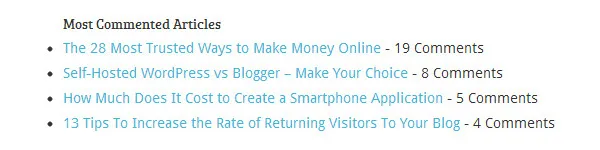
將以下代碼添加到 functions.php 文件以顯示評論最多的帖子。
function wpb_most_commented_posts() {
ob_start();?>
<ul class="most-commented">
<?php
$query = new
WP_Query('orderby=comment_count&posts_per_page=10');
while($query->have_posts()) : $query->the_post(); ?>
<li><a href="<?php the_permalink(); ?>" title="<?php the_title(); ?>"><?php the_title(); ?></a> <span class="wpb-comment-count"><?php comments_popup_link('No Comments;', '1 Comment', '% Comments'); ?></span></li>
<?php endwhile; ?>
</ul>
<?php// Turn off output buffering
$output = ob_get_clean();
return $output; }
add_shortcode('wpb_most_commented', 'wpb_most_commented_posts');
add_filter('widget_text', 'do_shortcode');
#20。 啟用特色圖片支持
絕大多數 WordPress 主題都支持特色圖片,但如果您不支持,您可以通過將其插入到 functions.php 文件中來啟用它。
add_theme_support( 'post-thumbnails' );
#21。 顯示最新評論
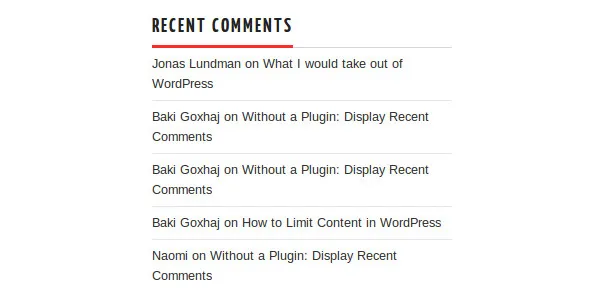
在循環中的任何位置使用此代碼以顯示五個最新評論。
<?php
$query = "SELECT * from $wpdb->comments WHERE comment_approved= '1'
ORDER BY comment_date DESC LIMIT 0 ,5";
$comments = $wpdb->get_results($query);
if ($comments) {
echo '<ul>';
foreach ($comments as $comment) {
$url = '<a href="'. get_permalink($comment->comment_post_ID).'#comment-'.$comment->comment_ID .'" title="'.$comment->comment_author .' | '.get_the_title($comment->comment_post_ID).'">';
echo '<li>';
echo '<div class="img">';
echo $url;
echo get_avatar( $comment->comment_author_email, $img_w);
echo '</a></div>';
echo '<div class="txt">Par: ';
echo $url;
echo $comment->comment_author;
echo '</a></div>';
echo '</li>';
}
echo '</ul>';
}
?>
準備好破解了嗎?
使用這些方便的調整併增強您的 WordPress 網站的功能!