
20 多个最受欢迎的 WordPress 循环黑客
已发表: 2017-12-20循环是 WordPress 中的主要过程,因此几乎在每个主题文件中都可以找到。 本质上,它是平台用来通过主题模板文件显示帖子的 PHP 代码。 换句话说,它是巨大的。 事实上,这很关键,因为如果没有循环,该站点将无法工作。
调整这组令人难以置信的强大功能可能会提升您的 WordPress 网站的功能。 例如,您可以更改帖子在主页上的显示方式,并使用特定参数对其进行排序。 鉴于循环是最容易修改的东西,人们可以获得非常令人印象深刻和创造性的技巧。
让我们向您展示 20 多种循环技巧,您现在应该使用它来实现它,而无需安装插件。
#1。 在第一篇文章之后放置广告
作为博主,您非常清楚广告是赚钱的最佳方式之一。 从访问者那里获得那些急需的点击肯定是一件棘手的事情,许多博主并不喜欢高点击率。 在第一个帖子之后放置广告可能是增加它们的好方法,所以试试这个简单的调整。
用下面的循环替换你的循环。 请注意,因为您必须在此处粘贴广告代码:
<?php if (have_posts()) : ?>
<?php $count = 0; ?>
<?php while (have_posts()) : the_post(); ?>
<?php $count++; ?>
  <?php if ($count == 2) : ?>
          //Insert the code of an ad in this line
          <h2><a href="<?php the_permalink(); ?>"><?php the_title(); ?></a></h2>
          <?php the_excerpt(); ?>
   <?php else : ?>
          <h2><a href="<?php the_permalink(); ?>"><?php the_title(); ?></a></h2>
          <?php the_excerpt(); ?>
  <?php endif; ?>
<?php endwhile; ?>
<?php endif; ?>
#2。 显示过时但流行的 1 年前的帖子

您博客上的一些帖子虽然是在一年前创建的,但可能仍然在您的读者中很受欢迎。 例如,它可以是操作指南文章或其他类型的常青内容。 为了确保这些帖子保持流行,您可以应用这个方便的技巧。
将此代码插入到 single.php 文件中:
<?php
$current_day = date('j');
$last_year = date('Y')-1;
query_posts('day='.$current_day.'&year='.$last_year);
if (have_posts()):
    while (have_posts()) : the_post();
       the_title();
       the_excerpt();
    endwhile;
endif;
?>
#3。 在循环中显示五个最新的置顶帖子
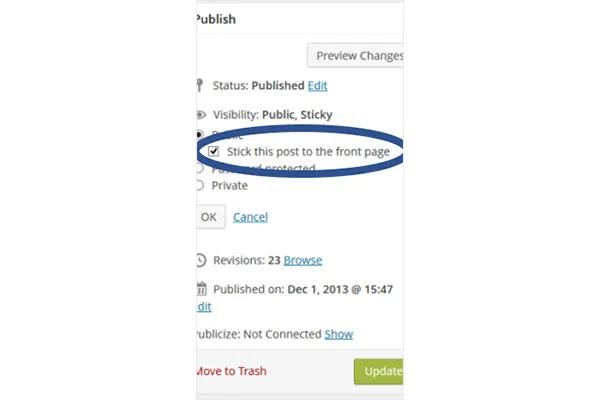
默认功能允许将一篇帖子粘贴到首页。 下面的黑客放置了五个粘性帖子。
许多博主将置顶帖子视为特色帖子,因为它们允许条目显示在其他帖子之上。 如果您想创建自己的“编辑精选”类别,可以使用 hack。 下面的代码必须插入主题中的任何位置才能工作。 您还可以通过替换第四行中的数字来更改数字以显示更少的帖子。
<?php
$sticky = get_option('sticky_posts');
rsort( $sticky );
$sticky = array_slice( $sticky, 0, 5);
query_posts( array( 'post__in' => $sticky, 'caller_get_posts' => 1 ) );

if (have_posts()) :
    while (have_posts()) : the_post();
        the_title();
        the_excerpt();
    endwhile;
endif;

?>
#4。 列出特定类别的帖子
使用下面的 hack 区分来自同一类别的帖子。
如果出于某种原因您需要区分共享同一类别的帖子(例如,论文作者的操作指南文章),请将以下代码插入到循环文件中。
<?php foreach((get_the_category()) as $category) {
      	$thecat = $category->cat_ID . ' ';
    	query_posts('child_of='.$thecat);
 if (have_posts()) : while (have_posts()) : the_post();
    //Classic WP loop
 endwhile;endif;
?>
#5。 提供未来职位列表
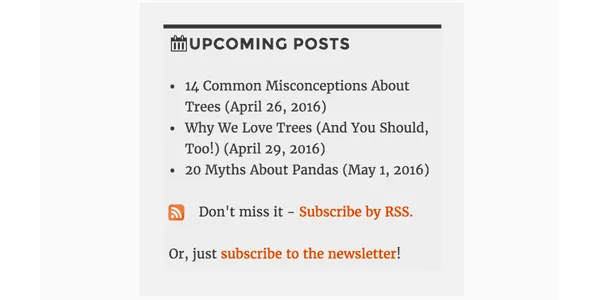
让读者了解即将发布的帖子可能会激发他们的兴趣并让他们返回您的博客阅读它们。 如果这对您来说是个好主意,请使用下面的代码在您的 WordPress 网站上提供即将发布的帖子的简短列表。
<?php query_posts('showposts=10&post_status=future'); ?>
<?php if ( have_posts() ) : while ( have_posts() ) : the_post(); ?>
    <h2><?php the_title(); ?></h2>
    <span class="datetime"><?php the_time('j. F Y'); ?></span></p>
<?php endwhile;
else: ?><p>No future events scheduled.</p>
<?php endif; ?>
#6。 获取在特定日期上传的帖子
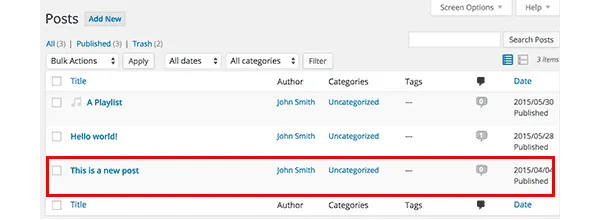
如果您经常在您的提要中查找一些帖子,您可以使用循环搜索它们。 可以通过插入以下代码使搜索变得非常容易。 具体来说,它检索在您指定的两个日期之间发布的条目。
<?php
  function filter_where($where = '') {
        $where .= " AND post_date >= '2012-08-19' AND post_date <= '2012-08-11'";
    return $where;
  }
add_filter('posts_where', 'filter_where');
query_posts($query_string);
while (have_posts()) :
      the_post();
      the_content();
endwhile;

?>
#7。 显示图像循环
WordPress 网站首页上的图片库是个好主意,因为大多数人都喜欢视觉效果。 如果您的帖子包含主要图片,下面的代码将检索它们以循环展示。
将以下代码插入到 functions.php 文件中:
function catch_that_image() {
  global $post, $posts;
  $first_img = '';
  ob_start();
  ob_end_clean();
  $output = preg_match_all('/<img.+src=['"]([^'"]+)['"].*>/i', $post->post_content, $matches);
  $first_img = $matches [1] [0];

  if(empty($first_img)){ //Determines a default image
    $first_img = "/images/default.jpg";
  }
  return $first_img;
}
#8。 通过设置过期日期自动删除帖子
假设您正在举办一场比赛以增加您博客上的读者群。 比赛结束后,您会公布结果,最重要的是公布答案或提示,以及它们的线索。 当然,读者不应该永远可以访问它们,因为您将来可能会举办另一场比赛,对吧?
即使您忘记了帖子,也可以删除它们的一个好方法是通过设置到期日期来安排它。 下面的循环替换了您现有的循环并做到了这一点。
不要忘记使用 mm/dd/yyyy 00:00:00 格式来替换过期时间。
<?php
if (have_posts()) :
while (have_posts()) : the_post(); ?>
$expirationtime = get_post_custom_values('expiration');
if (is_array($expirationtime)) {
$expirestring = implode($expirationtime);
}

$secondsbetween = strtotime($expirestring)-time();
if ( $secondsbetween > 0 ) {
// For example…
the_title();
the_excerpt();
}
endwhile;
endif;
?>
#9。 从引用中分离评论

您博客上的热门条目将与许多其他网站链接。 为确保读者可以舒适地关注评论部分的讨论,您应该将评论和引用分开。
您所要做的就是打开 comments.php 并查找以下内容:
foreach ($comments as $comment) : ?>
// Comments are displayed here
endforeach;
找到了? 太好了,现在用新代码替换它:
<ul class="commentlist">
<?php //Displays comments only
foreach ($comments as $comment) : ?>
<?php $comment_type = get_comment_type(); ?>
<?php if($comment_type == 'comment') { ?>
<li>//Comment code goes here</li>
<?php }
endforeach;
</ul>

<ul>
<?php //Displays trackbacks only
foreach ($comments as $comment) : ?>
<?php $comment_type = get_comment_type(); ?>
<?php if($comment_type != 'comment') { ?>
<li><?php comment_author_link() ?></li>
<?php }
endforeach;

</ul>
#10。 显示相关帖子

显示相关帖子是增加读者群的好方法。 您所要做的就是将特殊代码粘贴到 single.php 文件中。
<?php
  $backup = $post;  // backup the current object
  $tags = ks29so_get_post_tags($post->ID);
  $tagIDs = array();
  if ($tags) {
    $tagcount = count($tags);
    for ($i = 0; $i < $tagcount; $i++) {
      $tagIDs[$i] = $tags[$i]->term_id;
    }
    $args=array(
      'tag__in' => $tagIDs,
      'post__not_in' => array($post->ID),
      'showposts'=>5,
      'caller_get_posts'=>1
    );
    $my_query = new WP_Query($args);
    if( $my_query->have_posts() ) {
      while ($my_query->have_posts()) : $my_query->the_post(); ?>
        <h3><a href="<?php the_permalink() ?>" rel="bookmark" title="<?php the_title(); ?>"><?php the_title(); ?></a></h3>
      <?php endwhile;
    } else { ?>
      <h2>No related posts found!</h2>
    <?php }
  }
  $post = $backup;  // copy it back
  ks29so_reset_query(); // to use the original query again
?>

#11。 确定特定帖子在主页上的显示方式
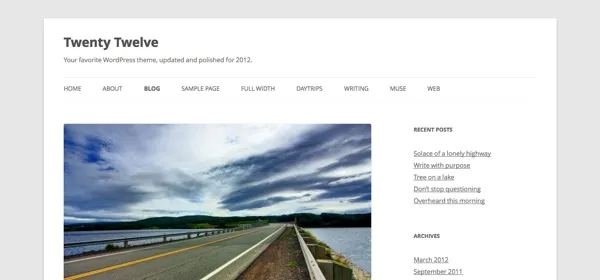
绝大多数 WordPress 主题在起始页上以相同的方式显示所有帖子。 但是,如果您不喜欢它,您可以更改它并定义哪些应该完全显示,哪些只有摘录就足够了。
找到 index.php 文件并在那里寻找循环。 以下代码替换它:
<?php if (have_posts()) :
    while (have_posts()) : the_post();
         $customField = get_post_custom_values("full");
         if (isset($customField[0])) {
             //Custom field is set, display a full post
              the_title();
              the_content();
         } else {
             // No custom field set, lets display an excerpt
              the_title();
              the_excerpt();
    endwhile;
endif;
?>
#12。 在主页上的帖子上方显示促销内容
在 index.php 文件中插入以下代码以添加促销内容。
<div class="content-loop">
#13。 列出页面中博客的所有作者
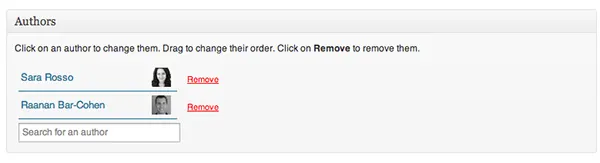
只需将此代码粘贴到循环中的任何位置即可显示所有作者的列表。
<ul>
<?php ks29so_list_authors('exclude_admin=0&optioncount=1&show_fullname=1&hide_empty=1'); ?>
</ul>
#14。 使用自定义字段显示来宾作者的姓名
如果您在博客上使用来宾作者,您很可能不会为他们创建单独的页面。 为什么不直接显示他们的名字呢?
将此代码插入到 single.php 中以执行此操作:
<?php $author = get_post_meta($post->ID, "guest-author", true);
if ($author != "") {
echo $author;
} else {
the_author();
} ?>
#15。 使图像成为发布的强制性要求
带有图片的帖子通常比没有图片的帖子获得更多的浏览量。 打开您的functions.php 文件以使它们成为强制性的。
add_action('save_post', 'wpds_check_thumbnail');
add_action('admin_notices', 'wpds_thumbnail_error');

function wpds_check_thumbnail( $post_id ) {
 // change to any custom post type
  if( get_post_type($post_id) != 'post' )
      return;

  if ( ! has_post_thumbnail( $post_id ) ) {
   // set a transient to show the users an admin message
    set_transient( "has_post_thumbnail", "no" );
   // unhook this function so it doesn't loop infinitely
    remove_action('save_post', 'wpds_check_thumbnail');
   // update the post set it to draft
    ks29so_update_post(array('ID' => $post_id, 'post_status' => 'draft'));

    add_action('save_post', 'wpds_check_thumbnail');
  } else {
    delete_transient( "has_post_thumbnail" );
  }
}

function wpds_thumbnail_error() {
 // check if the transient is set, and display the error message
  if ( get_transient( "has_post_thumbnail" ) == "no" ) {
    echo "<div class='error'><p><strong>You must add a Featured Image before publishing this. Don't panic, your post is saved.</strong></p></div>";
    delete_transient( "has_post_thumbnail" );
  }
}
#16。 注册后重定向到特定页面
打开functions.php文件并添加下面的代码。
function __my_registration_redirect(){
    return home_url( '/my-page' );
}
add_filter( 'registration_redirect', '__my_registration_redirect' );

#17. Insert Ads in Post
Use this code in your functions.php file to wrap ads in a post in any place you want.
Hack
function googleadsense($content){
  $adsensecode = 'Your Ad Codes Here';
  $pattern = '<!-googlead->';
  $content = str_replace($pattern, $adsensecode, $content);
  return $content;
}
add_filter('the_content', 'googleadsense');
#18。 使用简码展示广告
选择您要插入广告的位置并将以下代码粘贴到functions.php。
function showads() {
    return '
AD’S CODE HERE
';
}
add_shortcode('adsense', 'showads');
#19。 显示评论最多的帖子
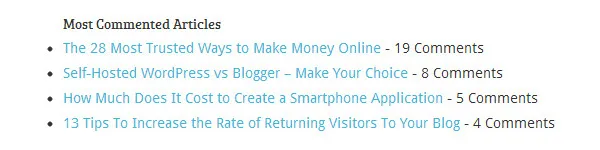
将以下代码添加到 functions.php 文件以显示评论最多的帖子。
function wpb_most_commented_posts() {
ob_start();?>
<ul class="most-commented">
<?php
$query = new
WP_Query('orderby=comment_count&posts_per_page=10');
while($query->have_posts()) : $query->the_post(); ?>
<li><a href="<?php the_permalink(); ?>" title="<?php the_title(); ?>"><?php the_title(); ?></a> <span class="wpb-comment-count"><?php comments_popup_link('No Comments;', '1 Comment', '% Comments'); ?></span></li>
<?php endwhile; ?>
</ul>
<?php// Turn off output buffering
$output = ob_get_clean();
return $output; }
add_shortcode('wpb_most_commented', 'wpb_most_commented_posts');
add_filter('widget_text', 'do_shortcode');
#20。 启用特色图片支持
绝大多数 WordPress 主题都支持特色图片,但如果您不支持,您可以通过将其插入到 functions.php 文件中来启用它。
add_theme_support( 'post-thumbnails' );
#21。 显示最新评论
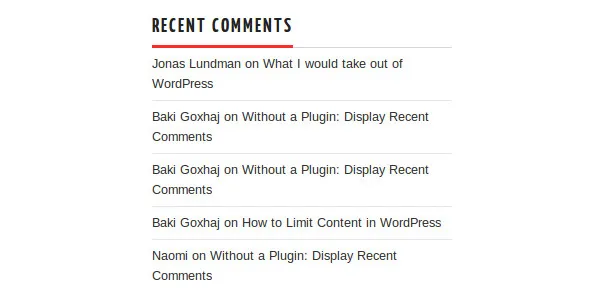
在循环中的任何位置使用此代码以显示五个最新评论。
<?php
$query = "SELECT * from $wpdb->comments WHERE comment_approved= '1'
ORDER BY comment_date DESC LIMIT 0 ,5";
$comments = $wpdb->get_results($query);
if ($comments) {
echo '<ul>';
foreach ($comments as $comment) {
$url = '<a href="'. get_permalink($comment->comment_post_ID).'#comment-'.$comment->comment_ID .'" title="'.$comment->comment_author .' | '.get_the_title($comment->comment_post_ID).'">';
echo '<li>';
echo '<div class="img">';
echo $url;
echo get_avatar( $comment->comment_author_email, $img_w);
echo '</a></div>';
echo '<div class="txt">Par: ';
echo $url;
echo $comment->comment_author;
echo '</a></div>';
echo '</li>';
}
echo '</ul>';
}
?>
准备好破解了吗?
使用这些方便的调整并增强您的 WordPress 网站的功能!