
Tinylog – เฟรมเวิร์กการบันทึกที่ใช้งานง่ายและน้ำหนักเบาสำหรับ Java รายละเอียดบทช่วยสอน HelloWorld และระดับการบันทึก
เผยแพร่แล้ว: 2021-11-09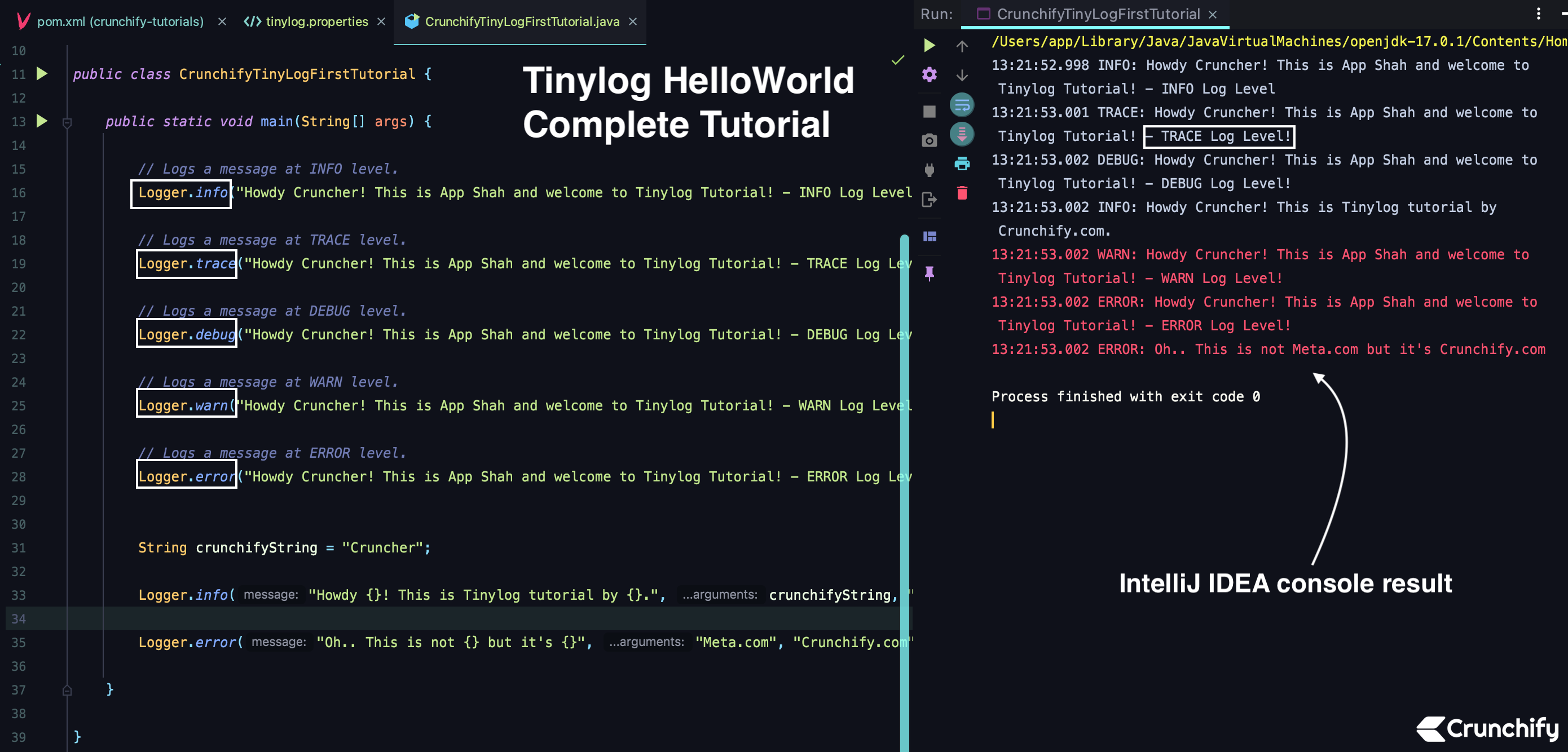
Tinylog คืออะไร?
Tinylog เป็นเฟรมเวิร์กการบันทึกที่เบาและเรียบง่ายสำหรับภาษา JVM จำนวนมาก มีตัวบันทึกแบบคงที่ ไม่จำเป็นต้องสร้างอินสแตนซ์ตัวบันทึกอื่นใดต่อคลาส
เช่นเดียวกับเฟรมเวิร์กการบันทึกมาตรฐานอื่นๆ (log4j) มันยังรองรับ 5 ระดับการบันทึกที่แตกต่างกัน
- ติดตาม
- DEBUG
- ข้อมูล – Default
- คำเตือน
- ข้อผิดพลาด
มีระดับการบันทึกของคุณเพื่อ trace เพื่อเปิดใช้งานการบันทึกทั้งหมด
สิ่งที่ Tinylog รองรับเฟรมเวิร์กทั้งหมด:
- Java
- คอตลิน
- สกาลา
- ภาษา JVM อื่นๆ
ข้อดีหลักของเฟรมเวิร์กการบันทึกของ tinylog คืออะไร
- น้ำหนักเบา (~170kb lib)
- มันเร็วกว่า
- มันง่ายมากที่จะนำไปใช้
- เป็นไปตามรูปแบบ log4j มาตรฐาน
- มันเป็นโอเพ่นซอร์ส
มาเริ่มกันเลยกับการเขียนโค้ดและตัวอย่าง HelloWorld Example
ขั้นตอนที่ 1
- เพิ่มการพึ่งพา Tinylog maven ให้กับไฟล์ pom.xml ของโปรเจ็กต์ของคุณ
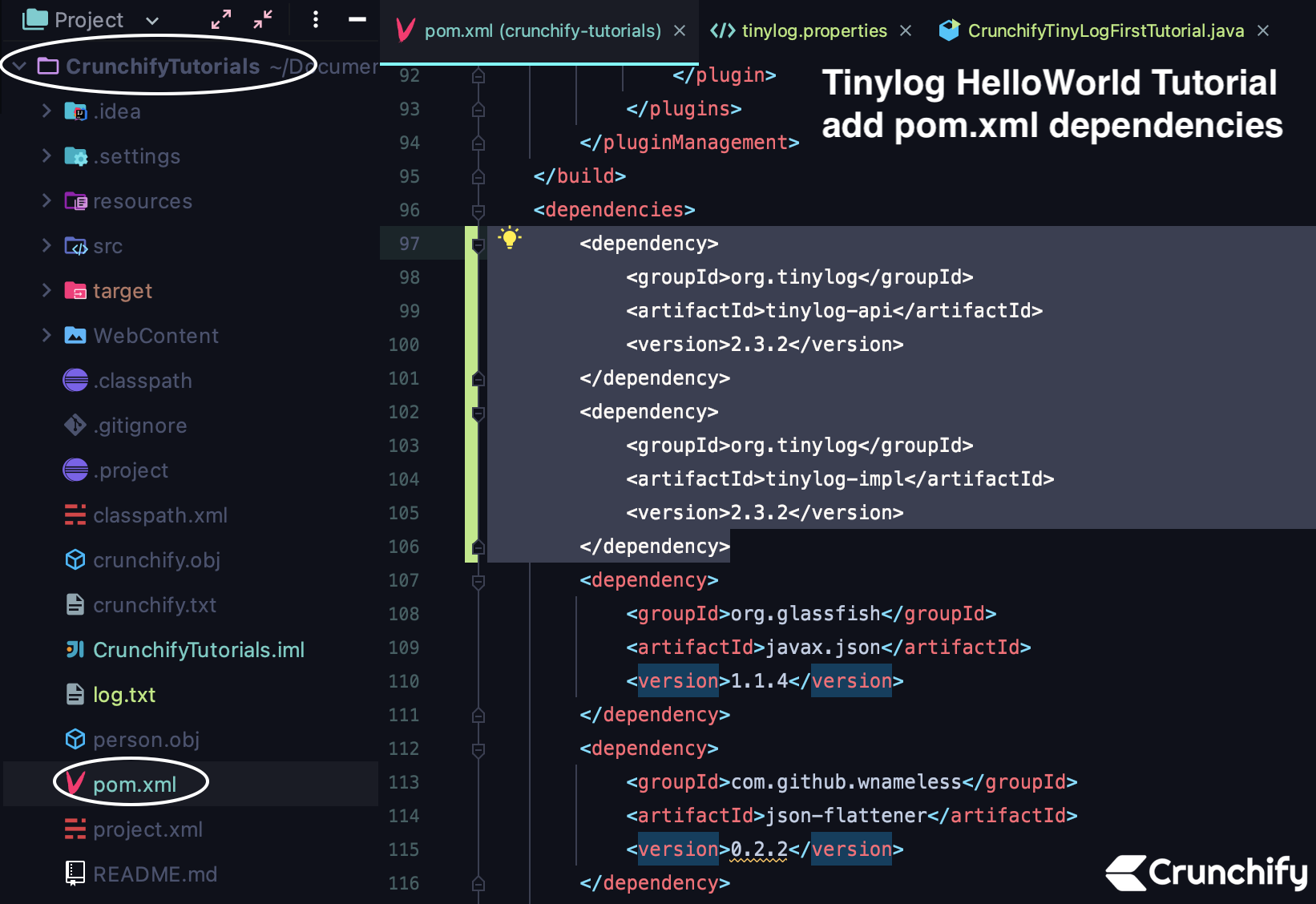
เปิดไฟล์ pom.xml ของโปรเจ็กต์ที่ใช้งานจริงและเพิ่มการพึ่งพาสองรายการด้านล่าง
|
1 2 3 4 5 6 7 8 9 10 |
< dependency > < groupId > org . tinylog < / groupId > < artifactId > tinylog - api < / artifactId > < version > 2.3.2 < / version > < / dependency > < dependency > < groupId > org . tinylog < / groupId > < artifactId > tinylog - impl < / artifactId > < version > 2.3.2 < / version > < / dependency > |
สร้างโครงการใหม่
ขั้นตอนที่ 2
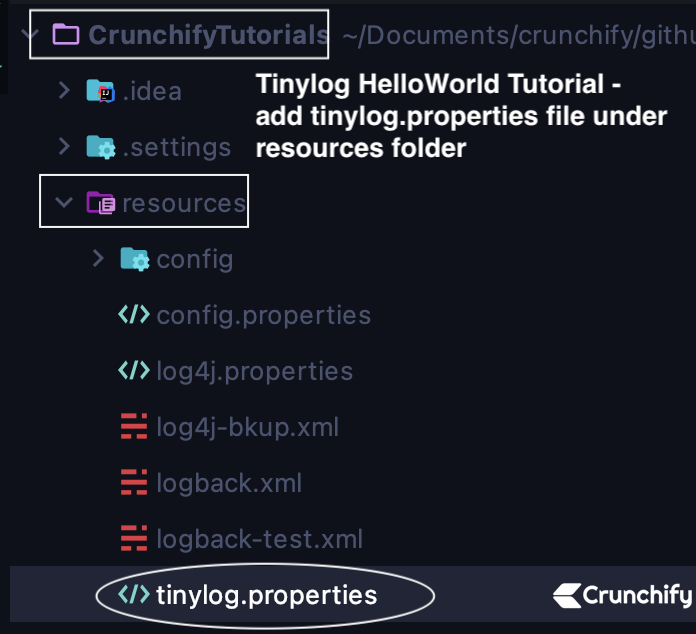
- เพิ่ม tinylog.properties ใต้โฟลเดอร์ /resources
- ไฟล์: tinylog.properties
|
1 2 3 4 5 6 7 8 9 10 |
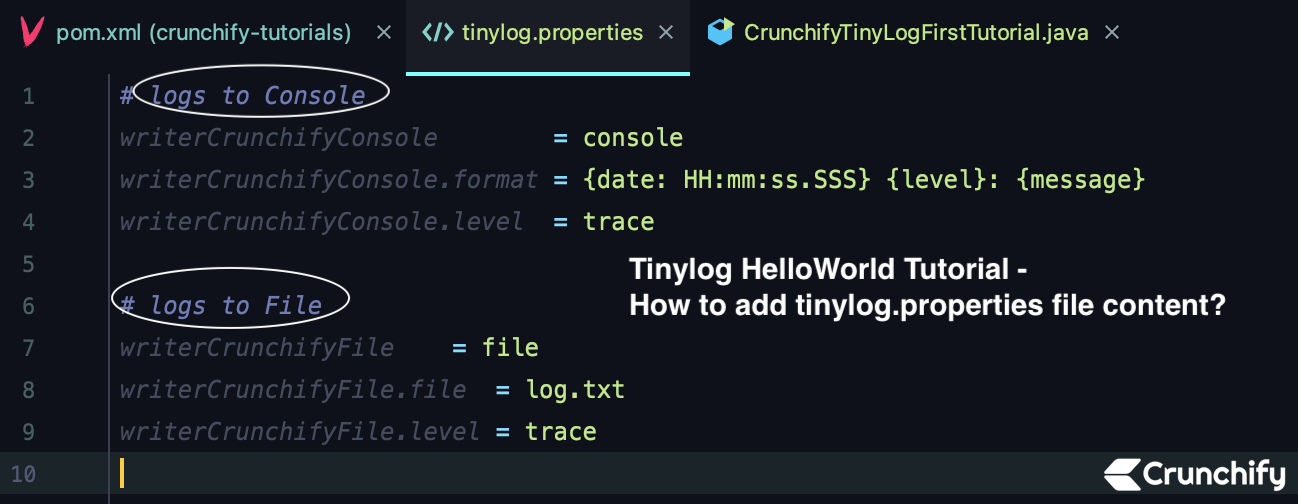
# logs to Console writerCrunchifyConsole = console writerCrunchifyConsole . format = { date : HH : mm : ss . SSS } { level } : { message } writerCrunchifyConsole . level = trace # logs to File writerCrunchifyFile = file writerCrunchifyFile . file = crunchifyLog . txt writerCrunchifyFile . level = trace |
ที่นี่เรามีอแดปเตอร์ Tinylog สองตัว
- อะแดปเตอร์
consoleTinylog- พิมพ์บันทึกในคอนโซล Eclipse / IntelliJ IDEA
- ตัวแปลง
fileTinylog- พิมพ์บันทึกในไฟล์ crunchifyLog.txt
ขั้นตอนที่ 3
- สร้างคลาส CrunchifyTinyLogFirstTutorial.java
|
1 2 3 4 5 6 7 8 9 10 11 12 13 14 15 16 17 18 19 20 21 22 23 24 25 26 27 28 29 30 31 32 33 34 35 36 37 38 39 40 |
package crunchify . com . java . tutorials ; import org . tinylog . Logger ; /** * @author Crunchify.com * Program: tinylog Hello World Tutorial with log levels and properties * */ public class CrunchifyTinyLogFirstTutorial { public static void main ( String [ ] args ) { // Logs a message at INFO level. Logger . info ( "Howdy Cruncher! This is App Shah and welcome to Tinylog Tutorial! - INFO Log Level" ) ; // Logs a message at TRACE level. Logger . trace ( "Howdy Cruncher! This is App Shah and welcome to Tinylog Tutorial! - TRACE Log Level!" ) ; // Logs a message at DEBUG level. Logger . debug ( "Howdy Cruncher! This is App Shah and welcome to Tinylog Tutorial! - DEBUG Log Level!" ) ; // Logs a message at WARN level. Logger . warn ( "Howdy Cruncher! This is App Shah and welcome to Tinylog Tutorial! - WARN Log Level!" ) ; // Logs a message at ERROR level. Logger . error ( "Howdy Cruncher! This is App Shah and welcome to Tinylog Tutorial! - ERROR Log Level!" ) ; String crunchifyString = "Cruncher" ; Logger . info ( "Howdy {}! This is Tinylog tutorial by {}." , crunchifyString , "Crunchify.com" ) ; Logger . error ( "Oh.. This is not {} but it's {}" , "Meta.com" , "Crunchify.com" ) ; } } |
คัดลอกโค้ดด้านบนและบันทึกไฟล์
ขั้นตอนที่ 4
รันโปรแกรมด้านบนเป็น Java Application แล้วจะเห็นผลดังนี้
|
1 2 3 4 5 6 7 8 9 10 11 |
/ Users / app / Library / Java / JavaVirtualMachines / openjdk - 17.0.1 / Contents / Home / bin / java - javaagent : / Applications / IntelliJ IDEA . app / Contents / lib / idea_rt . jar = 60075 : / Applications / crunchify . com . java . tutorials . CrunchifyTinyLogFirstTutorial 13 : 21 : 52.998 INFO : Howdy Cruncher ! This is App Shah and welcome to Tinylog Tutorial ! - INFO Log Level 13 : 21 : 53.001 TRACE : Howdy Cruncher ! This is App Shah and welcome to Tinylog Tutorial ! - TRACE Log Level ! 13 : 21 : 53.002 DEBUG : Howdy Cruncher ! This is App Shah and welcome to Tinylog Tutorial ! - DEBUG Log Level ! 13 : 21 : 53.002 INFO : Howdy Cruncher ! This is Tinylog tutorial by Crunchify . com . 13 : 21 : 53.002 WARN : Howdy Cruncher ! This is App Shah and welcome to Tinylog Tutorial ! - WARN Log Level ! 13 : 21 : 53.002 ERROR : Howdy Cruncher ! This is App Shah and welcome to Tinylog Tutorial ! - ERROR Log Level ! 13 : 21 : 53.002 ERROR : Oh . . This is not Meta . com but it ' s Crunchify . com Process finished with exit code 0 |
คุณสามารถใช้รูปแบบการบันทึกใดกับ tinylog ได้บ้าง
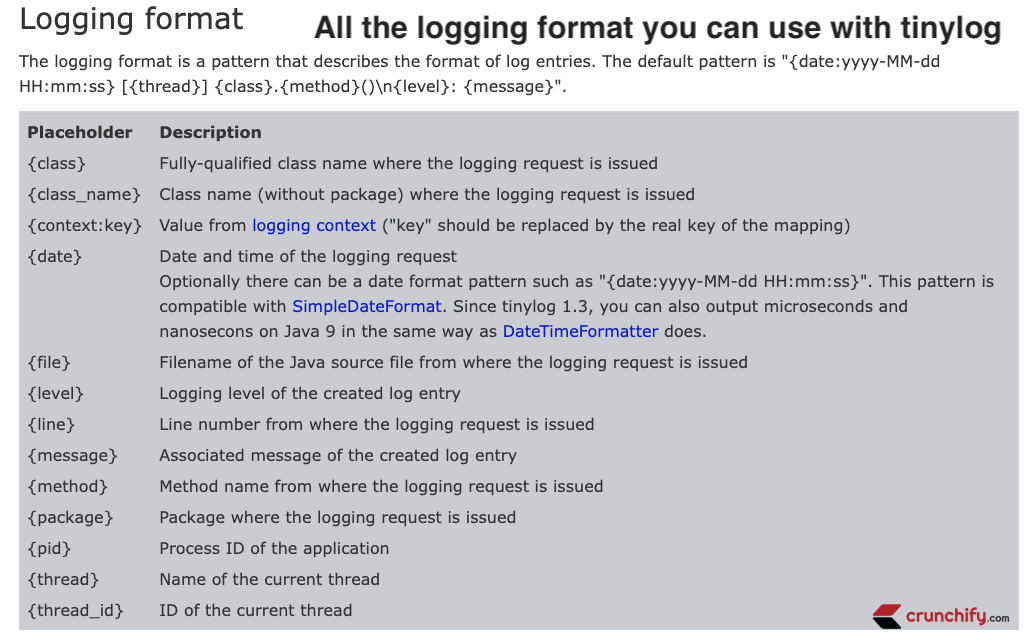
| ชื่อ | คำอธิบาย |
|---|---|
| ระดับ | ชื่อคลาสที่มีคุณสมบัติครบถ้วนที่ออกคำขอบันทึก |
| CLASS_NAME | ชื่อคลาส (ไม่มีแพ็คเกจ) ที่ออกคำขอบันทึก |
| บริบท | ตั้งค่าทั้งหมดจากบริบทการบันทึก (ใหม่ใน tinylog 1.1) |
| วันที่ | วันที่และเวลาของคำขอเข้าสู่ระบบ |
| ข้อยกเว้น | โยนข้อยกเว้น ( null หากไม่มีการโยน) |
| ไฟล์ | ชื่อไฟล์ของซอร์สไฟล์ Java ที่ออกคำร้องขอการบันทึก |
| ระดับ | ระดับการบันทึกของรายการบันทึกที่สร้างขึ้น |
| ไลน์ | หมายเลขบรรทัดที่ออกคำขอบันทึก |
| ข้อความ | ข้อความที่เกี่ยวข้องของรายการบันทึกที่สร้างขึ้น |
| กระบวนการ | ชื่อเมธอดที่ออกคำขอบันทึก |
| บรรจุุภัณฑ์ | แพ็คเกจที่ออกคำขอบันทึก |
| PROCESS_ID | รหัสกระบวนการของแอปพลิเคชัน |
| RENDERED_LOG_ENTRY | รายการบันทึกที่แสดงผลขั้นสุดท้ายเนื่องจากจะใช้สำหรับผลลัพธ์ที่เป็นข้อความ |
| THREAD_ID | ID ของเธรดปัจจุบัน |
| THREAD_NAME | ชื่อกระทู้ปัจจุบัน |
คุณสามารถใช้ผู้เขียนกับ tinylog ได้กี่คน?
| นักเขียน | ชื่อ | คำอธิบาย |
|---|---|---|
| ConsoleWriter | คอนโซล | เขียนรายการบันทึกไปยังคอนโซล |
| นักเขียนไฟล์ | ไฟล์ | เขียนรายการบันทึกไปยังไฟล์ที่กำหนด |
| JdbcWriter | jdbc | จัดเก็บรายการบันทึกในฐานข้อมูล SQL |
| LogcatWriter | logcat | ส่งต่อรายการบันทึกไปยังระบบบันทึกดั้งเดิมของ Android |
| RollingFileWriter | ไฟล์กลิ้ง | เช่นเดียวกับ FileWriter แต่ใช้หลายไฟล์โดยการหมุนไฟล์เหล่านั้น |
| SharedFileWriter | ไฟล์ที่ใช้ร่วมกัน | รองรับการเขียนโปรแกรมหลายตัวในไฟล์เดียวกัน |
| โมฆะ | โมฆะ | ละทิ้งรายการบันทึกทั้งหมด |
บันทึกโดยไม่มีไฟล์ tinylog.properties
สำหรับการอ้างอิง นี่คือบันทึก หากคุณไม่ได้เปิดใช้งานเฟรมเวิร์กการบันทึกใดๆ สำหรับแอปพลิเคชันของคุณ

|
1 2 3 4 5 6 7 8 9 10 11 12 13 14 15 16 17 18 19 |
< meta charset = "utf-8" / > / Users / app / Library / Java / JavaVirtualMachines / openjdk - 17.0.1 / Contents / Home / bin / java - javaagent : / Applications / IntelliJ IDEA . app / Contents / lib / idea_rt . jar = 60075 : / Applications / crunchify . com . java . tutorials . CrunchifyTinyLogFirstTutorial 2021 - 11 - 08 13 : 28 : 30 [ main ] crunchify . com . java . tutorials . CrunchifyTinyLogFirstTutorial . main ( ) INFO : Howdy Cruncher ! This is App Shah and welcome to Tinylog Tutorial ! - INFO Log Level 2021 - 11 - 08 13 : 28 : 30 [ main ] crunchify . com . java . tutorials . CrunchifyTinyLogFirstTutorial . main ( ) TRACE : Howdy Cruncher ! This is App Shah and welcome to Tinylog Tutorial ! - TRACE Log Level ! 2021 - 11 - 08 13 : 28 : 30 [ main ] crunchify . com . java . tutorials . CrunchifyTinyLogFirstTutorial . main ( ) DEBUG : Howdy Cruncher ! This is App Shah and welcome to Tinylog Tutorial ! - DEBUG Log Level ! 2021 - 11 - 08 13 : 28 : 30 [ main ] crunchify . com . java . tutorials . CrunchifyTinyLogFirstTutorial . main ( ) INFO : Howdy Cruncher ! This is Tinylog tutorial by Crunchify . com . 2021 - 11 - 08 13 : 28 : 30 [ main ] crunchify . com . java . tutorials . CrunchifyTinyLogFirstTutorial . main ( ) WARN : Howdy Cruncher ! This is App Shah and welcome to Tinylog Tutorial ! - WARN Log Level ! 2021 - 11 - 08 13 : 28 : 30 [ main ] crunchify . com . java . tutorials . CrunchifyTinyLogFirstTutorial . main ( ) ERROR : Howdy Cruncher ! This is App Shah and welcome to Tinylog Tutorial ! - ERROR Log Level ! 2021 - 11 - 08 13 : 28 : 30 [ main ] crunchify . com . java . tutorials . CrunchifyTinyLogFirstTutorial . main ( ) ERROR : Oh . . This is not Meta . com but it ' s Crunchify . com Process finished with exit code 0 |
และคุณพร้อมแล้ว แจ้งให้เราทราบหากคุณประสบปัญหาใด ๆ ในการรันบทช่วยสอน Tinylog นี้